Babyface: A Playful Script Font for Modern Editorial Design
A Real Publishing Moment: Choosing a Font for a Lifestyle Blog Redesign
Recently, I was deep into the redesign of a small lifestyle blog focused on home crafts and personal wellness. The goal was to create a warm, approachable, and visually engaging brand identity that would carry through blog headers, newsletter graphics, and printable worksheets. The font choice was crucial—especially for titles and feature quotes. That’s when I came across Babyface, a free handwritten script font that immediately caught my eye for its modern playfulness and editorial charm.
Visual Character and Editorial Mood
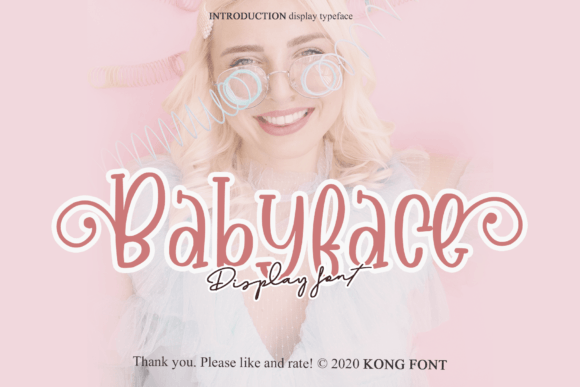
Babyface has a soft, flowing rhythm with a slightly bouncy baseline and rounded letterforms. It’s clearly inspired by natural handwriting, but with a modern twist that keeps it from feeling too casual or childish. The font’s personality is warm, approachable, and gently expressive—perfect for content that aims to feel human, relatable, and creative.
In the blog redesign, I used it for the main header and a few pull quotes scattered through long-form articles. It added a sense of personality without overpowering the content. The font has a slightly condensed structure, which helps maintain readability even at smaller sizes, though it’s best used for titles, subtitles, and short editorial accents rather than long blocks of body text.
Practical Uses in Digital and Print Editorial Layouts
Babyface works well in a variety of publishing formats, especially where visual hierarchy and brand tone matter. I tested it in a few different real-world applications:
- Blog Headers: Used in a lifestyle blog’s masthead, Babyface added a soft, inviting tone that matched the brand’s warm color palette.
- Recipe Ebook Titles: For a digital cookbook, it brought a handcrafted charm to chapter openers and recipe names.
- Newsletter Graphics: Paired with a clean sans serif like Lato or Roboto, Babyface made for a visually balanced header in a weekly email newsletter.
- Printable Planners: As a decorative font for section titles in a planner template, it gave the layout a personal, handmade feel.
It’s also a great fit for wedding guides, coaching workbooks, and course PDFs where the brand voice leans toward friendly and expressive.
Readability Considerations Across Mediums
One of the most important aspects of any font in editorial design is readability. Babyface holds up well on screen and in print, especially at medium to large sizes. It’s best suited for titles, pull quotes, and short headings rather than long paragraphs or small captions.
On mobile layouts, the font’s soft curves and open spacing help maintain clarity. However, in dense print formats or small body text, it can become visually tiring. For this reason, I wouldn’t recommend using Babyface for body copy in a digital magazine or formal report. Instead, pair it with a readable serif or sans serif font to create a balanced visual hierarchy.
Font Pairing and Editorial Consistency
Part of Babyface’s strength lies in how well it pairs with other fonts. In the lifestyle blog project, I paired it with a clean, modern serif like Merriweather for body text and a minimalist sans serif like Open Sans for captions and navigation menus. This combination gave the layout a cohesive structure while letting Babyface shine in its intended role—as a decorative, expressive font.
For newsletter headers or digital magazine covers, pairing Babyface with a bold sans serif like Montserrat or a classic serif like Playfair Display can create a strong visual contrast that draws the reader’s eye without sacrificing editorial tone.
Technical Notes and Licensing for Digital Creators
As a freebie, Babyface is accessible for bloggers, newsletter writers, and indie creators who want to elevate their design without investing in premium fonts. Before using it in client work or commercial templates, however, it’s important to check the font’s licensing terms. Most free script fonts are available for personal use, but may require a commercial license for use in paid digital products like ebooks, printables, or branded course materials.
Also, check for included styles, alternates, ligatures, and multilingual support. Babyface offers basic OpenType features, which are useful for customizing letterforms and improving typographic flow in titles and quotes. The font is available in both TTF and OTF formats, making it compatible with most design tools like Photoshop, Illustrator, and Silhouette Design Studio.