Mechane: A Playful Script Font for Modern Web Design Projects
Choosing the Right Font for a Creative Portfolio Homepage
While working on a creative portfolio homepage for a digital illustrator, I found myself browsing through script fonts that could reflect the artist’s personality without compromising readability. That’s when I came across Mechane—a modern, playful script font that felt just right for the hero section and logo treatment. I dropped it into the design, previewed it on both desktop and mobile, and immediately noticed how it brought a sense of warmth and approachability to the layout.
What Makes Mechane Stand Out
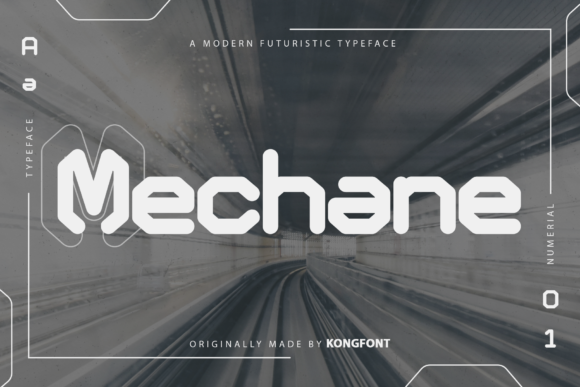
Mechane has a clean, contemporary script style with a slight bounce and open spacing, making it feel modern yet handmade. It walks the line between casual and professional, which is perfect for creative brands that want to stay polished without looking too formal. As a script font, it’s not meant for long paragraphs, but it shines in headlines, logo treatments, and short bursts of branded text.
What really sets Mechane apart is its digital clarity. It renders well on screens, especially at larger sizes, and maintains legibility even when used over light image overlays. This makes it a great choice for hero sections, promotional banners, and landing page headlines where visual impact matters most.
Testing Mechane in Real Web Layouts
I started by using Mechane in the hero section of the portfolio homepage. The font worked beautifully over a soft watercolor background, adding a creative flair that matched the illustrator’s style. I made sure to test the contrast and spacing, especially on mobile, where script fonts can sometimes become too tight or hard to read.
Next, I applied Mechane to the main navigation logo and a few section headers. The font scaled well across different viewport sizes, and its clean strokes held up even on lower-resolution displays. For body text and captions, I paired it with a neutral sans serif font to maintain readability and visual balance.
Where Mechane Works Best
- Hero Titles: Its playful yet modern look makes it perfect for landing page headlines and welcome messages.
- Logo Text: Ideal for brands with a creative or artistic identity looking for a custom feel without custom font costs.
- Call-to-Action Buttons: Especially effective for short phrases like “Explore My Work” or “See the Collection” when used at the right size.
- Section Headers: Adds personality to subheadings on landing pages, course sales pages, and portfolio sites.
- Social Media Graphics: Great for quote images, story highlights, and promotional banners where visual appeal is key.
Readability and Responsive Design Considerations
When using any script font on the web, readability should be a top priority. Mechane performs well in this area, especially when used thoughtfully. On mobile screens, I found that using it at 24px or larger helped maintain clarity. For dark backgrounds, I adjusted the letter spacing slightly and used a subtle text shadow to ensure the font didn’t blend into the background.
One thing to keep in mind is that script fonts can slow down visual scanning if overused. I reserved Mechane for high-impact areas and paired it with a clean sans serif for body text and navigation links. This helped maintain a clear visual hierarchy and ensured the site felt professional and easy to use.
Font Pairing Tips for Web Designers
Mechane pairs beautifully with minimalist sans serif fonts like Open Sans, Montserrat, or Inter. These combinations help balance the playful nature of the script with clean, modern readability. For editorial or blog-focused sites, you could even pair it with a serif font like Merriweather or Playfair Display for a more refined digital identity.
When building a digital brand kit, I recommend using Mechane as your primary display font and selecting a secondary font family for supporting content. This helps maintain brand consistency while ensuring your typography remains functional and accessible across devices.
Checking Font Usability and Licensing
Before deploying Mechane in a live project, I always double-check the included styles, available weights, and file formats. It’s important to confirm that the font includes web-optimized formats like WOFF and WOFF2 for fast loading and cross-browser compatibility.
Since Mechane is listed under Freebies and Fonts, I made sure to verify its commercial use license. This is especially important for client projects, online stores, and digital templates where font licensing can become a legal issue later on. Fortunately, Mechane comes with clear licensing terms that allow for both personal and commercial use, which made the integration process smooth.
Designing with Brand Identity in Mind
Whether you’re building a boutique online store, a coaching website, or a creative landing page, choosing the right typeface is part of shaping your brand’s voice. Mechane gives digital creators a modern script option that feels authentic and versatile. It’s not just about aesthetics—it’s about how the font supports your message and enhances the user experience.
In the case of the illustrator’s portfolio, using Mechane helped create a cohesive visual identity that extended from the website to social media graphics and email headers. It became a key part of the brand’s digital presence, reinforcing the creative tone across all touchpoints.
Final Layout Decisions and Takeaways
After testing and refining the design, I landed on a layout that used Mechane in the hero headline, logo, and a few key section headers. The rest of the typography was handled by a clean, modern sans serif to ensure balance and readability. The result was a polished, engaging homepage that felt both professional and personable.
If you’re looking for a script font that works well in modern web design without sacrificing usability, Mechane is definitely worth a try. Whether you're designing a product landing page, a digital brand kit, or a creative blog header, it brings a touch of personality that can elevate your design from good to great.